Fun Bridge
- 4.1
- Rating
- 500.00K
- Installs
- Free
- Price

 Analysis by App-foxy
I approached Fun Bridge as a beginner-friendly way to get into bridge without first buying a book, finding a partner, or sitting at a physical table. It is a free card game from Goto Games, and its central appeal is simple: you can learn the basic rhythm of bridge while playing rather than trying to absorb every rule in advance. That makes it a particularly approachable choice if the game has always looked interesting but intimidating.
Bridge is not just about choosing the highest card. You are trying to understand the strength of a hand, communicate through bidding, and then make careful decisions during play. That combination gives this game more depth than a quick solitaire session, but it also means the first few rounds can feel unfamiliar. My recommendation is to treat the opening session as a guided introduction, not as a test of whether you are already good at cards.
Getting from the first deal to a meaningful win
I’d treat a first deal as a chance to connect the bidding with the cards that follow, rather than as a score to chase. Once I can explain why I chose one play—even if it turns out badly—I have a useful foothold for the next hand. From there, the next challenge is telling a genuine rules puzzle from a decision that simply needs more practice.
You May Also Like

 Blood Strike: 2.5 Anniversary
Blood Strike’s Loadouts Turn Every Drop Into a Tactical Gamble
A close look at Blood Strike’s custom loadouts: how fast access to signature weapons reshapes its battle royale rhythm, rewards preparation, and narrows the gap between fights.

 Pandora - Music & Podcasts
Pandora’s Music Is Easy to Start, but Harder to Recover
Pandora’s strength is its low-effort path from a seed to a station. Its weak spot is how much confidence it asks you to place in connection, setup, and quiet recovery.

 8 Ball Pool
 Is Built on Rivalries, Rematches, and Routine
A close look at the rivalries, rematches, shared routines, and unanswered safety questions that turn a quick pool match into a persistent mobile community.

 Samsung Music
’s Quiet Strength Is Playing What You Already Own
Its reach comes less from spectacle than from dependable access to a personal library. That simplicity is both the app’s strongest retention engine and its ceiling.

 AccuWeather: Weather Radar
AccuWeather Review: A Quick, Clear Forecast for Everyday Decisions
For everyday plans, the best forecast is the one you can understand quickly. AccuWeather makes rain timing, radar, and local conditions easy to act on, with a few trade-offs.

 Hill Climb Racing
Why Hill Climb Racing Still Turns Crashes Into One More Run
A tiny car, a bumpy hill and one more upgrade: Hill Climb Racing keeps resurfacing because its simple chaos makes every near-miss feel personal.
More From Our News Desk



What to expect before you start playing
The game belongs firmly in the card game category, but bridge feels very different from games where every decision is immediately visible. A hand can look ordinary until the bidding reveals its potential, and a seemingly strong card may be better saved for a later trick. The most rewarding part is gradually noticing these connections for yourself.
The store summary presents bridge as useful for learning and memory, and I think that description makes sense when understood practically. You have to remember which suits have appeared, watch how opponents respond, and keep track of the plan you formed before play began. It is a quiet, concentrated kind of entertainment rather than something I would choose when I only have the attention span for rapid rounds.
Because the game is free to download, it is easy to try without committing money at the outset. There are in-app purchases ranging from $0.99 to $309.99 per item, so I would still advise checking the purchase flow carefully before confirming anything. The free entry point is useful for deciding whether bridge suits you, while the optional spending means the app deserves the same purchase awareness as any other free-to-start game.
Its Everyone age rating also makes it suitable for a broad audience. That does not mean every child will find it immediately entertaining: bridge requires patience, reading, and an interest in planning. For adults who want a calm mental activity, older players returning to cards, or families looking for a thoughtful alternative to faster games, the tone is a good fit.
Setting up a comfortable first session
Fun Bridge was released on August 16, 2012, and the current version is 6.11.2. It supports devices running Android 7.0 or later. Before installing, I would check the operating system on an older phone or tablet, especially if the device has been kept for occasional games rather than updated regularly. On a compatible device, the setup should be a straightforward download-and-play experience.
For the first session, I would avoid trying to learn every bridge convention at once. Begin by identifying the four suits, the order of card values, and the idea that each trick is won by the highest appropriate card. Then pay attention to the bidding as a separate stage. Keeping those two parts mentally distinct prevents a common beginner mistake: judging the entire hand only by the cards you can see.
A larger screen can make the table easier to read, particularly when several cards, bids, or instructions are visible at the same time. A phone is convenient for short practice sessions, but a tablet is more comfortable if you plan to study the layout or play several hands in one sitting. I also prefer playing when notifications are quiet, because a missed bid or hurried tap can make a beginner think the rules are more confusing than they really are.
One useful preparation habit is to decide what you want from the session. If your goal is learning, pause after each unfamiliar decision and ask why that card or bid made sense. If your goal is relaxation, accept that you may make imperfect choices and simply follow the hand through. Bridge becomes frustrating when every early mistake is treated as evidence that you cannot learn it.
How to recognize your first real success
Your first meaningful success does not have to be a spectacular score. I would count it as successfully following a complete deal, understanding what the bidding was trying to establish, and making a deliberate choice during play instead of tapping randomly. That is the point where bridge starts to feel like a system you can improve at rather than a wall of unfamiliar terminology.
During the opening hands, watch the relationship between your planned contract and the tricks you actually take. If you expected a suit to help you but opponents quickly remove your control, remember that for the next deal. This is one of the best ways to learn: connect an earlier decision with a later consequence. The lesson becomes much clearer when it comes from your own hand.
I also recommend choosing one observation target per round. You might track only which suits have been played, or focus on whether you are protecting a winning card for later. Trying to count everything immediately is unnecessary. A narrow focus gives you a repeatable method for improvement and makes each new hand feel manageable.
Another practical technique is to replay your thinking after a disappointing result. Instead of asking only, “Why did I lose?”, ask, “At which moment did my plan change?” Perhaps the opening lead altered your expectations, or perhaps you spent a high card too early. This kind of review turns a failed hand into a short lesson and is more valuable than simply starting another deal without reflection.
Where new players commonly get confused
The bidding stage is usually the first major hurdle. Beginners often assume that a bid directly describes the cards they want to play immediately. In reality, it helps communicate the shape and strength of a hand and establishes an intended target for the contract. If the terminology feels dense, concentrate on understanding the purpose of the exchange before memorizing every possible meaning.
The second confusion is the difference between winning an individual trick and fulfilling the overall contract. Taking a trick feels good, but it may not help if it uses a card needed to control a later sequence. I found it more useful to think several plays ahead: which suit might opponents lead next, which cards can safely be released, and where a winning card should be preserved.
Trump can also make the first few hands seem unpredictable. A trump card can beat cards from other suits, but using one is not automatically the best move. Sometimes it is better to keep that control for a later trick; sometimes taking the trick now protects the contract. When unsure, compare the immediate gain with the value of retaining flexibility.
New players may also wonder why a seemingly sensible move produces a poor result. Bridge contains incomplete information, so a good decision can still lead to an unfavorable hand. That is an important distinction. Judge your choice by what you knew at the time, not only by the final outcome. This mindset keeps the game educational instead of turning every loss into a source of irritation.
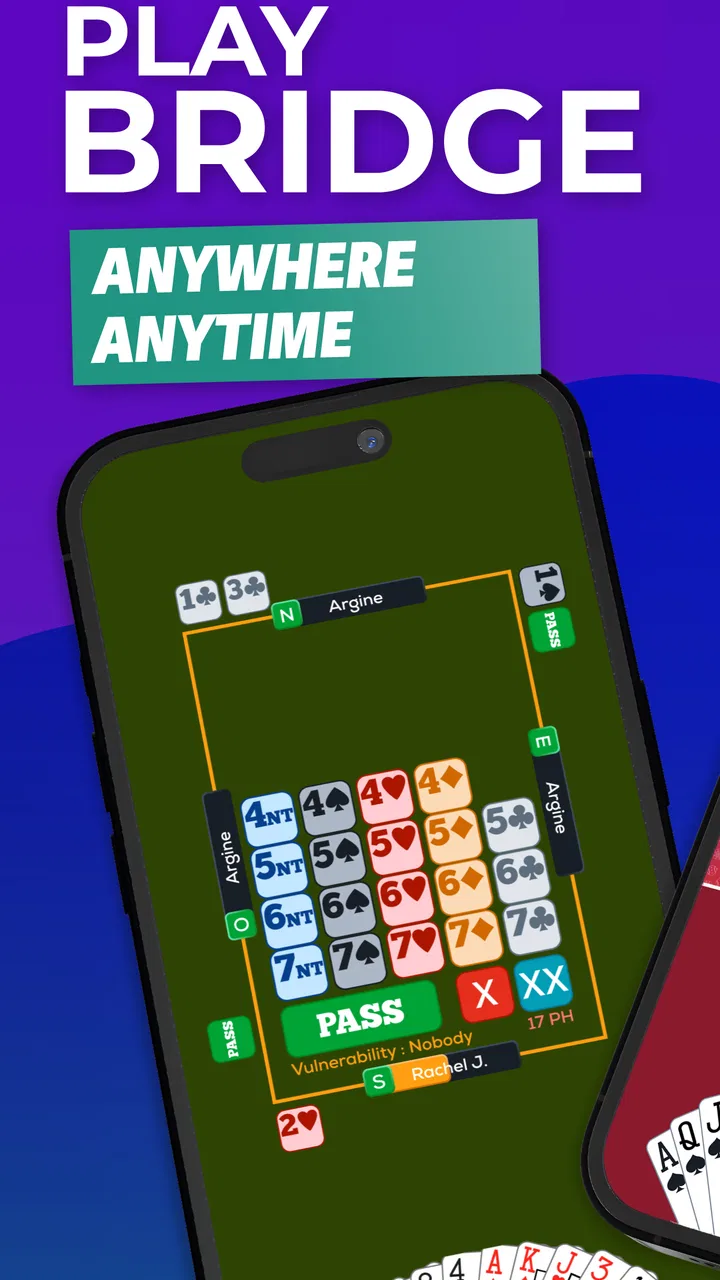
Another source of friction is the sheer amount of information on the table. If the interface feels busy, slow down and read one area at a time: first the current contract, then the cards in play, then the remaining options. Rapidly scanning the whole screen encourages accidental choices. For a first-time user, deliberate pacing is more valuable than speed.
Small habits that make the learning curve easier
Keep a simple mental record of the suits that have already been exhausted. When nobody can follow a suit, that fact changes the balance of the hand. You do not need a detailed written chart for every round; even noticing one or two voids can help you understand why an opponent suddenly gains control.
Pay attention to the opening lead rather than treating it as background information. It often gives you an early clue about how the other side may be organized. If you are playing the contract, use that clue to adjust your plan. If you are defending, consider what your partner’s lead may be trying to communicate. This is a more advanced habit, but it is also one of the fastest ways to make the game feel purposeful.
Do not automatically play the highest card available. Ask whether a smaller card can win, whether the trick should be allowed to pass, and what you want the next player to lead. This restraint is a genuine bridge skill and one reason the game remains interesting after the basic rules become familiar.
Finally, separate learning sessions from score-focused sessions. In a learning session, experiment with a different line of play and accept that it may fail. In a score-focused session, use the patterns you already understand and make conservative choices. Mixing those goals can make progress difficult to see, while separating them gives you room to improve without feeling that every experiment was a mistake.
Who will enjoy it, and who may prefer something else
Fun Bridge is a strong match for someone who wants a thoughtful card game with a genuine learning curve. It suits players who enjoy pattern recognition, memory, and decisions that become clearer over repeated hands. It is also useful for people who want to practice bridge concepts privately before joining a social table, since the digital format removes the embarrassment of being the only beginner in a group.
I would be more cautious recommending it to someone seeking an instant, low-effort distraction. If you want a game that can be understood in a minute and finished in a few taps, a simple solitaire game or a fast matching game will probably feel more satisfying. Bridge asks you to invest attention before it pays off, and no interface can remove that underlying complexity.
It may also be a poor choice if you strongly prefer direct competition with friends in the same room. A physical bridge group offers conversation, shared teaching, and social energy that a mobile game cannot fully reproduce. On the other hand, the app is more convenient when your usual partner is unavailable or when you want to rehearse ideas alone.
Compared with ordinary solitaire, this game offers more strategic interaction but less instant relaxation. Compared with casual multiplayer card games, it is slower and more analytical. Compared with a printed bridge guide, it gives you an active table to learn from rather than only explanations, although a book may still be better when you want to study terminology in a structured way.
What to do after the first few hands
Once the basic flow feels familiar, choose a single area to develop. Learning to evaluate the opening hand is a sensible next step because it affects the bidding that follows. Alternatively, focus on defense, where patience and observation matter more than flashy plays. Specializing briefly helps you notice progress that would be hidden if you tried to improve every skill at once.
Use the app as a practice space, not as a final authority on your entire bridge education. If a rule or bidding meaning remains unclear, consult a reliable bridge explanation separately and then return to the game to test the idea. This combination works better than expecting repeated play alone to explain every convention.
There is also value in creating a regular routine. A short, focused session several times a week can be more useful than one long session followed by a month away. After each visit, remember one decision you would repeat and one you would change. That small review habit gives your play direction without turning a leisure game into homework.
The game has a 4.1 average from around 12 thousand ratings, with over 500 thousand installs, which suggests that it has reached a substantial audience while still leaving room for mixed experiences. I would interpret that sensibly: it is established enough to be worth trying, but the rating should not replace your own judgment about whether bridge fits your preferred pace.
For me, the strongest reason to recommend it is the low-pressure route into a complicated card tradition. You can begin with almost no background, make mistakes privately, and gradually understand why a careful decision matters. The main caution is equally clear: the free download is only the beginning of a game that rewards patience, and optional purchases mean you should remain attentive during any spending prompts.
If you want a calm, skill-based card experience and are willing to learn one idea at a time, I think Fun Bridge is worth installing. Start by completing one full hand, identify the contract, and review one decision afterward. That modest goal is enough to reach the first satisfying breakthrough without pretending that bridge can be mastered in a single evening.
FAQs for Fun Bridge
01What is Funbridge, and how does the app work?
Funbridge is an online bridge platform designed for players who want to practice and play contract bridge on mobile devices or computers. After creating an account, you can play deals against artificial-intelligence opponents, join tournaments, compete in rankings, and sometimes play at your own pace. The app is suitable for beginners and experienced players, although the available features may depend on your subscription or account type.
02Is Funbridge suitable for beginners learning bridge?
Yes, Funbridge can be useful for beginners, especially those who already understand the basic rules of bridge and want to practice regularly. The app offers guided learning content, practice deals, and opportunities to play against computer opponents without waiting for other people. However, complete newcomers may still need introductory lessons because the app focuses more on playing and improving than explaining every rule from the beginning.
03Can I play Funbridge with real people or only against the computer?
Funbridge provides several ways to play, including games against artificial-intelligence opponents and competitive formats involving other players. Depending on the mode, you may play the same deal as users around the world and compare your result on a leaderboard. Some formats are asynchronous, so you do not always need to be online at the same time as your opponents, while other events may follow specific schedules.
04Is Funbridge free to download and use?
Funbridge can generally be downloaded without an upfront charge, but access to its complete collection of games, tournaments, training material, and other features may require a subscription or in-app purchase. Free access can be limited by the number of deals or available activities. Before subscribing, check the current pricing, renewal terms, and cancellation rules shown in the Google Play Store or Apple App Store.
05What devices and internet connection are required for Funbridge?
Funbridge is intended for Android and iOS devices, and it may also be available through compatible desktop or web versions, depending on the service configuration. A stable internet connection is recommended because your account, tournaments, rankings, and game data are handled online. Performance can vary on older phones or tablets, so users should keep the operating system updated and ensure enough storage for installation and future updates.
Pros
- Clear interface makes bidding and gameplay easy to follow.
- Practice options help players improve bidding and card-play skills.
- Online tournaments add variety beyond standard casual matches.
- Available on mobile devices for convenient games on the go.
- Useful tools support analysis and review after a hand.
Cons
- Many features require a paid subscription or additional purchases.
- The competitive format may feel intimidating for bridge beginners.
- A stable internet connection is needed for most online activities.
- Matchmaking and tournament availability can vary by time and region.
- The interface may feel dense on smaller smartphone screens.

Fun Bridge
Gallery